Best High Airflow PC Fans: DARKROCK Leads Six

Six 120mm and 200mm case fans lined up by bearing type, RPM ceiling and warranty length. Which one you buy depends on how many mounts your case has and how quiet you need the desk.

By Sidney GrayUpdated 15 min read
On this page
- Best high airflow PC fans at a glance
- The deciding specification most buyers overlook
- How I screened the field down to six
- 1. DARKROCK 3-Pack 120mm Black Computer Case Fans — Best overall
- 2. ASUS ROG Strix XF120 Whisper-Quiet — Best premium
- 3. NZXT F120Q Quiet Airflow PC Case Fan — Best for heavy use
- 4. be quiet! Pure Wings 3 120mm Silent PWM — Best for small spaces
- 5. Thermaltake Pure 20 Series 200mm — Best for families
- 6. Kingwin 120mm Silent Fan CF-012LB — Best budget pick
- What high airflow actually means on a spec sheet
- 120mm versus 200mm: which mount wins?
- How long will these fans really last?
- What to check before you click buy
- The verdict
- FAQ
The best high airflow PC fans for most builders are the DARKROCK 3-Pack 120mm Black Computer Case Fans, a three-fan set spinning at up to 1200 RPM with hydraulic bearings rated for 30,000 hours. If you want a single premium unit instead of a bundle, the ASUS ROG Strix XF120 wins on longevity, with a magnetic-levitation bearing rated at 400,000 hours and a 5-year warranty. The right pick depends on how many mounts your case has and how quiet the room needs to stay.
Best high airflow PC fans at a glance
| Pick | Size & speed | Bearing & life | Price |
|---|---|---|---|
Best overall DARKROCK 3-Pack 120mm Black Computer Case Fans |
120mm 1200 RPM max claim |
Hydraulic 30,000 hr claim |
Check Price |
Best premium ASUS ROG Strix XF120 Whisper-Quiet |
120mm 250–1800 RPM PWM |
MagLev 400,000 hr claim |
Check Price |
Best for heavy use NZXT F120Q Quiet Airflow PC Case Fan |
120mm PWM controlled |
Fluid dynamic 60,000 hr claim |
Check Price |
Best for small spaces be quiet! Pure Wings 3 120mm Silent PWM |
120mm PWM 5.29 oz |
Rifle 80,000 hr claim |
Check Price |
Best for families Thermaltake Pure 20 Series 200mm |
200mm x 30mm 0.94 lb |
Sleeve manufacturer warranty |
Check Price |
Best budget pick Kingwin 120mm Silent Fan CF-012LB |
120mm 3.99 oz |
Sleeve 100,000 hr claim |
Check Price |


The deciding specification most buyers overlook
Ask ten builders what makes a fan "high airflow" and eight will say RPM. That's not what decides it. The bearing type does, because it sets the noise floor at the speed you actually need to hit CFM. A sleeve bearing at 1200 RPM sounds nothing like a fluid-dynamic bearing at the same speed, and it wears out sooner. Every other spec in this set is downstream of that choice.
Here is how the six break down by bearing:
- Sleeve: Thermaltake Pure 20 Series 200mm and Kingwin CF-012LB
- Rifle: be quiet! Pure Wings 3
- Hydraulic: DARKROCK 3-Pack
- Fluid dynamic: NZXT F120Q, at a 60,000-hour claim
- Magnetic-levitation: ASUS ROG Strix XF120, at a 400,000-hour claim
Bearing type is not the whole story. Blade count, frame gap, mount thickness and PWM control all feed into real-world airflow. But it is the one spec that predicts how the fan will sound after two years of dust, and it costs nothing to check on a listing.
How I screened the field down to six
Three cuts got the list to six, in order.
- Anything without a stated bearing type was cut. If the listing wouldn't say what was inside the hub, the fan came off the shortlist.
- Anything with a lifespan claim under 25,000 hours was cut. That's the point below which a fan is likely to outlast only the warranty and not the build.
- Anything without at least one specific airflow-oriented design claim was cut. A high-profile blade, a chamfered frame, a minimised blade-to-frame gap, an airflow-optimised profile: at least one had to be there in the listing text.
What survived is what you see. Six fans that a listing will actually describe in enough detail to compare, from six different brands, spanning entry to premium price positions. Five are 120mm. One is a 200mm intake fan for cases with a large front or top cutout. Every one publishes a bearing type. Every one publishes a lifespan figure or a warranty term, and most publish both.
1. DARKROCK 3-Pack 120mm Black Computer Case Fans — Best overall
The three-fan pack is what makes it the default: you get a full intake wall for the price position of a single premium unit.
Best for: builders filling three intake mounts in one go Skip it if: your motherboard only exposes 4-pin PWM headers
Most builds need at least two case fans to move air properly, and often three: two intake, one exhaust. Buying premium fans one at a time is where the budget quietly disappears. The DARKROCK pack gives you three 120mm units with a nine-blade rotor, a 1200 RPM maximum speed claim and a 3-pin motherboard connector. DARKROCK says the maximum noise sits at 32.1 dBA and that soft silicone corner cushions absorb vibration at speed. The hydraulic bearing carries a 30,000-hour lifespan claim: shorter than the fluid-dynamic and MagLev picks in this set, but ample for most build lifetimes.
The trade-off is control. The 3-pin interface means voltage control from the motherboard rather than proper PWM, so ramp curves are less precise than the ASUS or NZXT picks here. DARKROCK also publishes fewer specs than be quiet! and NZXT, and there's no separate warranty term listed. As the second-cheapest option here, and the only three-pack, it's still the highest-yield way to fill a case.
Pros:
- Three fans in a single purchase
- 1200 RPM claim with a 32.1 dBA ceiling
- Hydraulic bearing, 30,000-hour claim
- Silicone corner cushions for vibration
- Nine-blade rotor for concentrated airflow
Cons:
- 3-pin connector, not PWM
- No stated warranty term
- Shorter bearing life than the pricier picks
2. ASUS ROG Strix XF120 Whisper-Quiet — Best premium
The 5-year warranty and 400,000-hour MagLev bearing claim make this the fan you buy once and forget about.

Best for: quiet-focused builds and long-warranty buyers Skip it if: you need three fans and hate spending per unit
ASUS publishes more spec detail on this fan than any other pick in the set, and every number tilts toward longevity. The magnetic-levitation bearing carries a 400,000-hour lifespan claim, more than six times the next-longest here. The RPM window runs from 250 to 1800, which means the fan can spin down to almost inaudible at idle and still push a claimed 22.5 dB(A) at full tilt. The 4-pin PWM interface gives your motherboard proper control over that curve, and the 5-year warranty is the longest of the six, by a factor of two and a half over the next best.
At 7.05 oz, it's also the heaviest 120mm fan in this comparison, and the most expensive pick here. That price position for a single unit is the trade-off: you're paying for a bearing that outlasts the case. ASUS positions it as usable on radiators and CPU coolers as well as cases, which the others in this set don't all promise.
Pros:
- MagLev bearing, 400,000-hour claim
- 5-year warranty, the longest in this set
- 22.5 dB(A) claim at full speed
- 250–1800 RPM PWM range
- Usable on radiators and CPU coolers
Cons:
- The most expensive pick here
- Sold as a single fan only
- Heavier than the other 120mm picks
3. NZXT F120Q Quiet Airflow PC Case Fan — Best for heavy use
Fluid-dynamic bearings and a chamfered frame make this the pick for a rig that runs long sessions.

Best for: 24/7 rigs that run games, renders and streams Skip it if: you want RGB or a bundled pack
The F120Q is a 2024 release, and the specification NZXT leads with is the fluid-dynamic bearing, rated at 60,000 hours. That's a middle-of-the-set figure, longer than the DARKROCK claim and shorter than the be quiet! rifle bearing at 80,000 hours, but the bearing type itself is the more relevant fact: fluid-dynamic bearings tend to hold their noise floor better under long, continuous load than sleeve or hydraulic designs. NZXT says nine sickle-style blades and a chamfered frame produce a concentrated airflow pattern, and PWM control adjusts speed dynamically to system temperature.
The 2-year manufacturer warranty is standard for this tier, matching be quiet! and half of the ASUS premium term. It's the second-most expensive pick here, and it's sold as a single unit, so a three-fan intake wall costs materially more than the DARKROCK bundle. The trade-off buys you a newer platform and a bearing better suited to constant use.
Pros:
- Fluid-dynamic bearing, 60,000-hour claim
- PWM control for temperature-based curves
- Chamfered frame for concentrated airflow
- Nine sickle-style blades
- 2024 release, newest platform here
Cons:
- Second-most expensive pick here
- Sold as a single unit
- Shorter bearing life than the ASUS and be quiet! picks
4. be quiet! Pure Wings 3 120mm Silent PWM — Best for small spaces
The tightest published depth in this set, plus a rifle bearing rated at 80,000 hours.

Best for: mini-ITX and slim-cased builds needing PWM control Skip it if: you're mounting to a 200mm cutout
be quiet! publishes the tightest depth measurement here, at 0.5 inches, and the fan weighs 5.29 oz. That combination matters in mini-ITX cases and slim mid-towers, where a millimetre of extra depth is what makes the front bezel refuse to close over a radiator. be quiet! says the frame outlet is designed for radiator use, with seven airflow-optimised blades that reduce noise under demanding configurations. The rifle bearing carries an 80,000-hour lifespan claim, second only to the ASUS MagLev figure among the six.
The 2-year warranty matches the NZXT pick. This is a 2023 release, PWM-controlled through a 4-pin connector, and sits at roughly mid-range for this set. The one weakness against the other 120mm picks is that be quiet! doesn't publish a peak RPM figure the way ASUS does, so you can't map its noise curve as precisely on paper. In a tight build where every millimetre of depth counts, that's a small price to pay.
Pros:
- Slimmest published depth here, 0.5 in
- Rifle bearing, 80,000-hour claim
- PWM control via 4-pin
- Radiator-optimised frame outlet, per the listing
- 2-year manufacturer warranty
Cons:
- No published peak RPM figure
- Sold as a single fan
- Shorter warranty than the ASUS pick
5. Thermaltake Pure 20 Series 200mm — Best for families
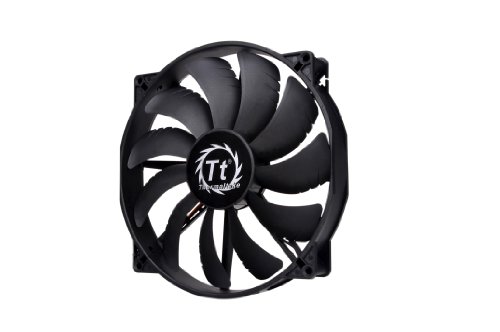
A 200mm intake fan is the fastest way to move a lot of air quietly, and this is the only one in the set.
Best for: shared rooms and living-room PCs where noise carries Skip it if: your case only has 120mm and 140mm mounts
Airflow at low noise is fundamentally a question of blade area. A single 200mm fan spinning slowly moves the same volume of air as two or three 120mm fans spinning faster, and it does it at a lower pitch that carries less across a room. Thermaltake's Pure 20 is 200mm across and 30mm thick, weighs 0.94 lb, and uses a sleeve bearing with an anti-vibration mounting system. Thermaltake says the blade design focuses airflow while reducing noise, which is the standard trade a large-format fan makes.
Two catches. First, your case has to have a 200mm mount, which is common on front intakes of larger mid-towers and full towers but absent on most compact builds. Second, sleeve bearings prefer horizontal orientation for the longest life, which suits a front intake fine but suits a top mount less well. It's the largest pick here by a wide margin, mid-range in price, and the only fan in this set that ships as a 200mm unit at all.
Pros:
- 200mm blade area, quietest per CFM
- 30mm thick frame for higher static pressure
- Anti-vibration mounting system
- Focused-airflow blade design, per the listing
- Manufacturer warranty stated
Cons:
- Requires a 200mm case mount
- Sleeve bearing, less suited to vertical mounting
- No stated warranty term in years
6. Kingwin 120mm Silent Fan CF-012LB — Best budget pick
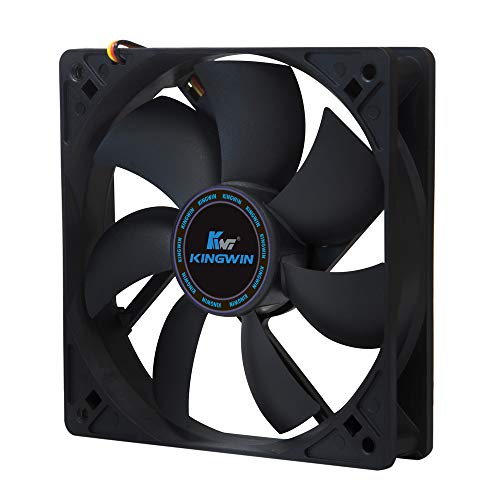
The cheapest of the six, with a 100,000-hour lifespan claim that beats every fan here except the ASUS.
Best for: one-fan replacements and starter builds Skip it if: you want PWM or a warranty beyond a year
Kingwin's CF-012LB is the cheapest of the six and, on paper, punches above its price. It's a 120mm sleeve-bearing fan at 3.99 oz, with high-profile fan blades that Kingwin says are designed for maximum airflow, and a 100,000-hour life expectancy claim. Only the ASUS MagLev fan claims a longer lifespan in this set. The 1-year manufacturer warranty is the shortest here, which is the give-and-take you expect at entry pricing.
There's no PWM. There's no stated RPM figure. There's no dB(A) claim. That's the real trade: Kingwin gives you a working fan with a long lifespan claim and a low price position, and you supply the tolerance for missing spec detail. As a straight replacement for a failed intake fan on an older build, or as filler on a first PC where the budget went to the GPU, it earns its slot. As the backbone of a new mid-range build, the DARKROCK pack is the better call.
Pros:
- The cheapest of the six
- 100,000-hour lifespan claim
- High-profile blade design, per the listing
- Compact 3.99 oz weight
- Simple 120mm mount
Cons:
- 1-year warranty, shortest here
- No PWM control
- Few published specs beyond size and life expectancy
What high airflow actually means on a spec sheet
The keyword promises high airflow, but Amazon's search is generous with that qualifier. Most 120mm case fans list themselves as high airflow. The phrase isn't a standardised measurement, and none of the listings in this set publish a CFM figure, so treat any pick's "high airflow" label as a design intent rather than a tested rating.
What you can compare on paper:
- Blade count. Seven blades on the be quiet!, nine on the DARKROCK and NZXT. More blades generally push more air at the cost of a slightly higher pitch.
- Frame gap and shape. NZXT calls out a chamfered frame that concentrates the airflow pattern. be quiet! calls out an outlet optimised for radiator use.
- Peak RPM. ASUS is the only pick in this set that publishes a peak figure, at 1800 RPM. DARKROCK gives 1200 RPM as its claim. The rest let the PWM curve do the talking.
- Frame depth. Thicker frames (the 30mm Thermaltake, the 0.9-inch ASUS) tend to produce higher static pressure, which matters if the fan is pulling through a dust filter or a radiator.
Two of the six also mention silicone or anti-vibration mounts, and that's worth reading closely. Fan noise at your desk is often decoupling noise, not blade noise.
120mm versus 200mm: which mount wins?
This decision is made by your case, not by you. Open the front panel and count mount holes. Most modern mid-towers accept two or three 120mm intakes, or a single 200mm one, or occasionally both.
If your case has a 200mm mount:
- A single 200mm fan will run quieter at the same effective airflow than three 120mm fans.
- It uses one fan header instead of three, which matters on boards with limited SYS_FAN pins.
- It usually costs less than three premium 120mm units, though more than a budget triple pack.
If your case only has 120mm mounts, or 120mm and 140mm mounts, the 200mm option is irrelevant regardless of how well it performs. A triple 120mm setup will beat a single 120mm every time, and this is where the DARKROCK pack earns its overall pick. For a fully populated intake wall in one purchase, it's the cleanest route in this set.
Both mount classes are compatible with radiators and dust filters, though thicker fans (the Thermaltake at 30mm) can foul on some radiator brackets. Measure clearance before you order.
How long will these fans really last?
Every fan in this set publishes a lifespan claim or a warranty term. Some publish both. Ranked by manufacturer lifespan claim:
- ASUS ROG Strix XF120: 400,000 hours (MagLev)
- Kingwin CF-012LB: 100,000 hours (sleeve)
- be quiet! Pure Wings 3: 80,000 hours (rifle)
- NZXT F120Q: 60,000 hours (fluid dynamic)
- DARKROCK 3-Pack: 30,000 hours (hydraulic)
- Thermaltake Pure 20: manufacturer warranty stated, no hour figure
Ranked by warranty term:
- ASUS ROG Strix XF120: 5 years
- be quiet! Pure Wings 3: 2 years
- NZXT F120Q: 2 years
- Kingwin CF-012LB: 1 year
- Thermaltake Pure 20 Series: manufacturer warranty, term not stated
- DARKROCK 3-Pack: not stated
A lifespan claim is a design target, not a guarantee. The warranty is what you can actually enforce. That is why the ASUS pick sits at the top of the second list too: a 5-year term is unusual in this category, and it's the single strongest reason to prefer it if you keep builds a long time.
What to check before you click buy
Six things to confirm on the listing before you order, in order of how often they trip up new builders:
- Header type. Your motherboard has 3-pin DC headers, 4-pin PWM headers, or both. The DARKROCK pack is 3-pin. The ASUS, NZXT and be quiet! picks are 4-pin PWM.
- Case mount size. 120mm and 200mm are the two mounts represented here. Confirm your case has the size before checkout.
- Frame depth. Most 120mm fans are 25mm thick. The Thermaltake here is 30mm. If you're mounting on a radiator, thicker fans can conflict with bracket screws.
- Fan count. DARKROCK ships three fans per order. Every other pick here ships one. Read the listing count field, not the product photo.
- Cable length. None of the six publishes an explicit cable length in the specifications, so plan a fan hub or splitter if you're populating a large case.
- Airflow direction. Every fan has an intake side and an exhaust side. The arrow is on the frame. Fitting one backwards is the single most common install mistake.
The verdict
If you're building a PC from scratch and need to fill an intake wall, buy the DARKROCK 3-Pack. It's the only three-fan set in this comparison, its 1200 RPM claim and 32.1 dBA ceiling are competitive for the price position, and the hydraulic bearing's 30,000-hour claim is enough for most build lifetimes. Three fans in a single order is where the value lives.
If you're building a premium rig or replacing a fan on a system you intend to keep for years, the ASUS ROG Strix XF120 is the runner-up and, on longevity, the winner. The MagLev bearing's 400,000-hour claim and the 5-year warranty are unmatched in this set, and the 250–1800 RPM PWM range gives you the widest control curve. The cutoff is simple: below three fans needed, ASUS wins on quality. At three fans and up, DARKROCK wins on total cost. If your case has a 200mm mount and noise is the priority, the Thermaltake Pure 20 slots in between them by moving more air at a lower speed.
FAQ
Are high airflow PC fans worth it over standard case fans?
High airflow PC fans are worth it if your case has restrictive dust filters, a mesh front panel, or a mounted radiator. In those conditions, blade design and frame shape genuinely change how much air reaches your components. On an unrestricted mesh case with cool ambient temperatures, a standard fan spinning slightly faster will get the same job done, so the value depends on the case as much as the fan.
Is the ASUS ROG Strix XF120 worth the premium over the DARKROCK three-pack?
The ASUS ROG Strix XF120 is worth the premium in one scenario: you need a single fan for a radiator or CPU cooler and you plan to keep the build for years. The 5-year warranty and 400,000-hour MagLev bearing claim justify the price for one unit. For a three-fan intake, the DARKROCK pack is the better call because it costs less for triple the fan count.
What size PC case fan should I choose, 120mm or 200mm?
The size is decided by your case, not preference. Open the front or top panel and check the mount holes. Most mid-towers take 120mm or 140mm fans; larger full towers add a 200mm option. A single 200mm fan like the Thermaltake Pure 20 runs quieter than three 120mm fans at the same effective airflow, but only if the mount is there in the first place.
How do the NZXT F120Q and be quiet! Pure Wings 3 compare?
The NZXT F120Q and be quiet! Pure Wings 3 are both PWM 120mm fans with 2-year warranties, so the split is on bearing type and depth. NZXT uses a fluid-dynamic bearing with a 60,000-hour claim, better suited to continuous use. be quiet! uses a rifle bearing with an 80,000-hour claim and publishes a 0.5-inch depth, which is the slimmest in this set. Choose NZXT for 24/7 rigs, be quiet! for tight builds.
What's the biggest pitfall when buying PC case fans?
The biggest pitfall when buying PC case fans is mismatching the connector. A 3-pin fan will run on a 4-pin PWM header, but you lose fine speed control. A 4-pin PWM fan will run on a 3-pin header at full speed only. Check whether your motherboard's SYS_FAN headers are 3-pin or 4-pin before ordering, and count how many free headers you have.
Cooling is one of the few upgrades in a PC build where the cheapest sensible option often outperforms the fanciest one, because three properly placed fans always beat one exotic fan spinning alone. Start with the DARKROCK pack, mount two as intake and one as exhaust, and see how the build sits under load before spending more. If the temperatures land where you want and the noise doesn't bother you at your desk, the job is done. If you want silence or a decade-long lifespan on a specific mount, upgrade that one fan to the ASUS and leave the rest. That is the order of operations that actually saves money.